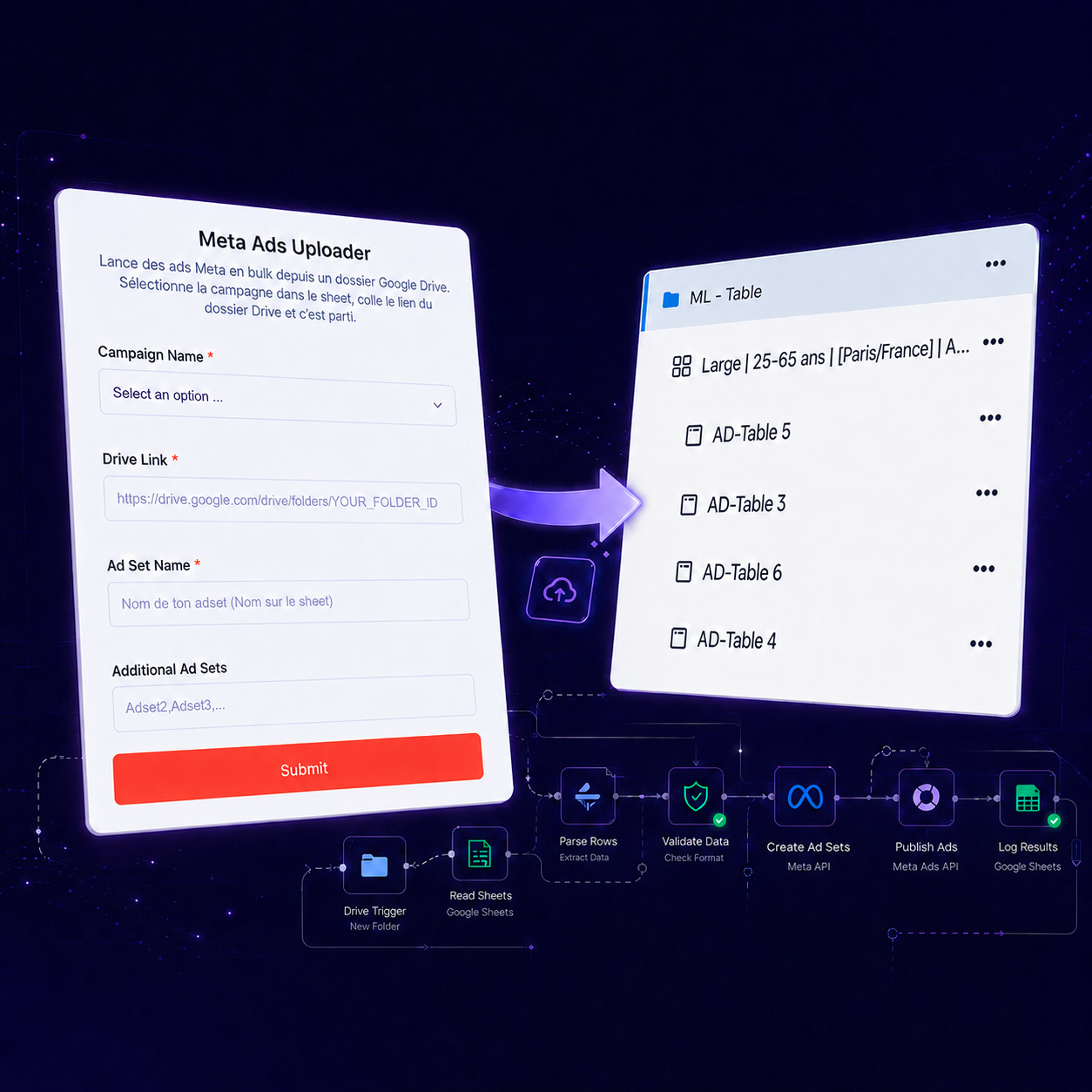
Google Drive Creative Import
Use the Drive folders your team already works with. No repeated downloading and uploading.
Stop downloading creatives, uploading files one by one, and repeating the same setup across campaigns. Select your campaign, paste your Google Drive folder, add your ad sets, and let MetaFlow prepare the launch.
Campaigns are created paused by default, so your team stays in control.
The same launch repeats the same slow, error-prone steps across three different tools.
Instead of moving between Google Drive, spreadsheets, and Meta Ads Manager, your team starts the entire launch from one simple interface.
Pick a prepared campaign from a dropdown.
Point to the folder with your images and videos.
Name the primary ad set for the launch.
Add several ad sets to launch them together.
Submit once and prepare everything at once.
From campaign selection to a reviewed, recorded launch.
Choose the campaign you want to launch. Its prepared settings are retrieved automatically.
Paste the Google Drive folder containing the images and videos for your campaign.
Enter one main ad set or launch several ad sets together.
MetaFlow prepares the campaigns and ads, keeps them paused for safety, and records the result.
A visual demonstration. The real launcher opens in a new tab.
Launch a full folder of campaign creatives without rebuilding every ad manually. MetaFlow works with the images and videos stored in your Google Drive folder.
Start a Bulk LaunchUse the Drive folders your team already works with. No repeated downloading and uploading.
Prepare multiple creatives and ad sets through one streamlined submission.
Organize campaign launches across different products without rebuilding the same process.
Support campaign setups prepared for different markets, countries, and locations.
Use prepared campaign information to keep names, settings, targeting, and budgets consistent.
New campaign elements are created paused by default, giving your team time to review before activation.
Record whether each launch completed successfully and keep the campaign tracker updated.
Know when a campaign is ready or when something needs attention.
Move faster without publishing unreviewed campaigns. MetaFlow prepares the launch and keeps the final activation decision with your team.
Created paused by defaultUse one streamlined form to launch creatives, ad sets, and campaign setups in bulk.
Open Campaign LauncherYour team stays in control. New campaign elements are prepared paused by default.
It prepares Meta Ads campaigns, ad sets, and ads in bulk from one launch form, so your team avoids repeating the same setup by hand.
From the Google Drive folder you link in the form. MetaFlow uses the creatives in that folder to build the ads.
Yes. Enter one main ad set and add more in the additional ad sets field to launch several together.
Yes. Campaigns are prepared per product and market, so you can launch across different products and countries.
No. New campaign elements are created paused by default, so your team reviews them before activation.
The launch status is recorded in your campaign tracker and a success or error notification is sent.
No. That's the point — the ads are prepared from your Drive folder and prepared settings instead of being built one by one.
MetaFlow works with the image and video formats supported by the connected Meta advertising setup.